SilentFrame: A Research POC on Post-Exploitation Credential Collection through Browsers
This article is in reference to our newest POC hosted on GitHub here: https://github.com/Emulated-Criminals/SilentFrame
For the last two weeks, the team and I have been working on a project we are calling Playbook, which is a quick-reference cheat sheet website to help fellow offensive security professionals quickly determine how to run a specific application or attempt a new technique they haven’t tried before.
More to come on Playbook later, but while writing these cheat sheets, we stumbled across a cool technique for collecting credentials on [Ired.team] knowledge repo.
(https://www.ired.team/offensive-security/credential-access-and-credential-dumping/stealing-web-application-credentials-by-hooking-input-fields)
It allows for hooking HTML input fields using the following one-liner:
```JavaScript
t=""; $('input[type="password"]').onkeypress = function (e) { t+=e.key; console.log(t); localStorage.setItem("pw", t); }
```
This one-liner hooks the input field labeled “password” and prints each key to the console. In other words, it’s a keylogger that logs only the password field of the tab. While this technique was promising, its use was impractical from an adversarial emulation/red teaming perspective.
In order for this attack to work, we would need:
1. RDP access into the host, for the user that we wish to target
2. the username for the specific tab we are hooking, and
3. the website we wanted to target already open.
Each of those three items alone is a threat actor’s no-go when considering OPSEC and stealth. So, we decided to take a break from developing the markdown files for Playbook and began devising how we could take this attack to the next level.
It should be no surprise that we, just like threat actors, love poisoning-the-well type attacks. If you are unfamiliar with what that type of attack is, it’s where the Threat Actor takes a commonly used, legitimate file, application, system, etc., and modifies it to act as the initiation point of the attack. A common poisoning-the-well attack is to open a commonly used Excel or Word document on a shared drive and add a macro that executes a malicious script. This works far better than attempting to use that document from a phishing perspective because it doesn’t carry the Mark-of-the-Web and is given more leeway in execution. Additionally, people are less likely to be concerned about an existing, previously used internal document, since it doesn’t follow preconceived notions of where threats come from.
So, how do we take the one-liner and turn it into a poisoning-the-well type attack? The first thing we needed to determine was how we could interact with the browser without using a GUI interface. We determined that the most realistic attack path would start from a C2 Agent, where console intractability is achieved, but synchronous desktop interaction is not achieved, or is not feasible, for maintaining stealth. This is where the Chrome DevTools Protocol (CDP) comes in. CDP is a legitimate remote debugging API that is included in Chrome and Edge, as they are Chromium-based browsers. It exists to enable developers to introspect, automate, and debug the browser and, when engaged, it exposes a control plane via a local WebSocket that can observe and manipulate the browser’s state well below the DOM and origin boundaries that most security controls address.
Now, CDP isn’t something you can just turn on while the browser is running. It requires that the browser be executed with the `--remote-debugging-port=9222` flag, and then, and only then, is that specific browser instance initiated with the remote debugger. Any other existing browser instance will not be affected. Now, “crashing” and auto-restarting a program isn’t hard, and is quite an effective trick against most non-technical users, but what if we could make it more persistent than that? We decided the best way to poison the well would be to modify the shortcut file itself to always execute with the CDP flag. To do that, a quick 5 lines in PowerShell can accomplish what we need.
Here’s an example using MS Edge:
```PowerShell
$wsh = New-Object -ComObject WScript.Shell
$sc = $wsh.CreateShortcut("$env:USERPROFILE\Desktop\Microsoft Edge.lnk")
$sc.TargetPath = "C:\Program Files (x86)\Microsoft\Edge\Application\msedge.exe"
$sc.Arguments = "--remote-debugging-port=9222"
$sc.Save()
```
Or if we wanted to accomplish that in one line:
```PowerShell
$sc=(New-Object -ComObject WScript.Shell).CreateShortcut("$env:USERPROFILE\Desktop\Microsoft Edge.lnk");$sc.Arguments=($sc.Arguments+" --remote-debugging-port=9222").Trim();$sc.Save()
```
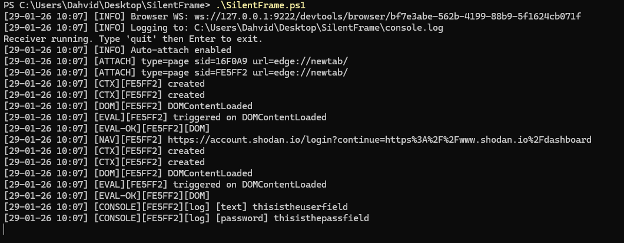
Once we established a way to create a persistent interface, we began crafting SilentFrame, a PowerShell script that would connect to the CDP interface, monitor for navigation and page renderers and, every time a tab would render a new page, inject a JavaScript DOM API based key logging string.
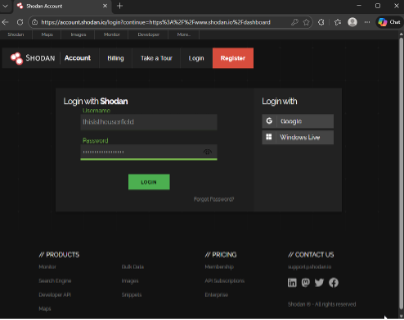
Our Final Result would look as such:
High-Level Technical Breakdown
SilentFrame starts by querying `http://127.0.0.1:9222/json/version`, which is the CDP discovery endpoint exposed by the browser when remote debugging is enabled. This endpoint returns metadata about the running browser instance, including the `webSocketDebuggerUrl`, which represents the browser’s primary control channel. It then establishes a single browser-level WebSocket connection to this endpoint rather than opening a per-tab connection, enabling it to operate as a centralized observer and controller.
Once connected, SilentFrame enables target discovery and automatic attachment by invoking `Target.setDiscoverTargets` and `Target.setAutoAttach`. This places the browser into an observable state where all existing and future targets, including tabs, iframes, and background pages, emit lifecycle events. Any newly created targets are automatically attached to the session without operator intervention, while targets that existed prior to the connection are enumerated using `Target.getTargets` and manually attached via the `Target.attachToTarget` function.
As targets are attached, SilentFrame maintains an internal mapping of `targetId` to `sessionId`. This mapping helps tremendously, as all subsequent CDP messages are multiplexed over the same WebSocket and must be demultiplexed to attribute events, logs, and script execution to the correct browsing context. At this point within the script, SilentFrame has persistent, browser-wide visibility into tab creation, navigation, and teardown without ever interacting with the desktop or browser UI. We purposely left artifacts within the POC so as not to just hand a dangerous weapon over to those with less morals, but it could be modified to remove these artifacts with the proper background knowledge.
For each attached target, SilentFrame waits until a valid web context exists before enabling higher-level domains. In this context, domain isn’t referring to a hosted named location, like a webpage, but instead a functional internal namespace within CDP, like `Runtime` or `Page`. Once a target resolves to an HTTP or HTTPS URL, it enables the `Runtime`, `Page`, and `Log` domains and turns on lifecycle event reporting. This ensures that the attack mechanism occurs only for actual web content, not for internal browser pages or transient targets.
From there, SilentFrame operates as a passive listener with selective active execution. It consumes messages forwarded through `Target.receivedMessageFromTarget`, logging console output, runtime exceptions, page lifecycle events, and other execution signals in real time. We decided that all message types should be consumed for debugging and visibility, though in practice, this can be reduced to a smaller subset focused on DOM activity, navigation events, runtime evaluation, and logging for brevity of logging without impacting functionality.
On `DOMContentLoaded`, a single JavaScript payload is injected using `Runtime.evaluate`, tracked with a unique message identifier to confirm execution and capture results. The page continues to load and function normally, but its execution environment now includes our script operator as an observer.
Defensive Considerations
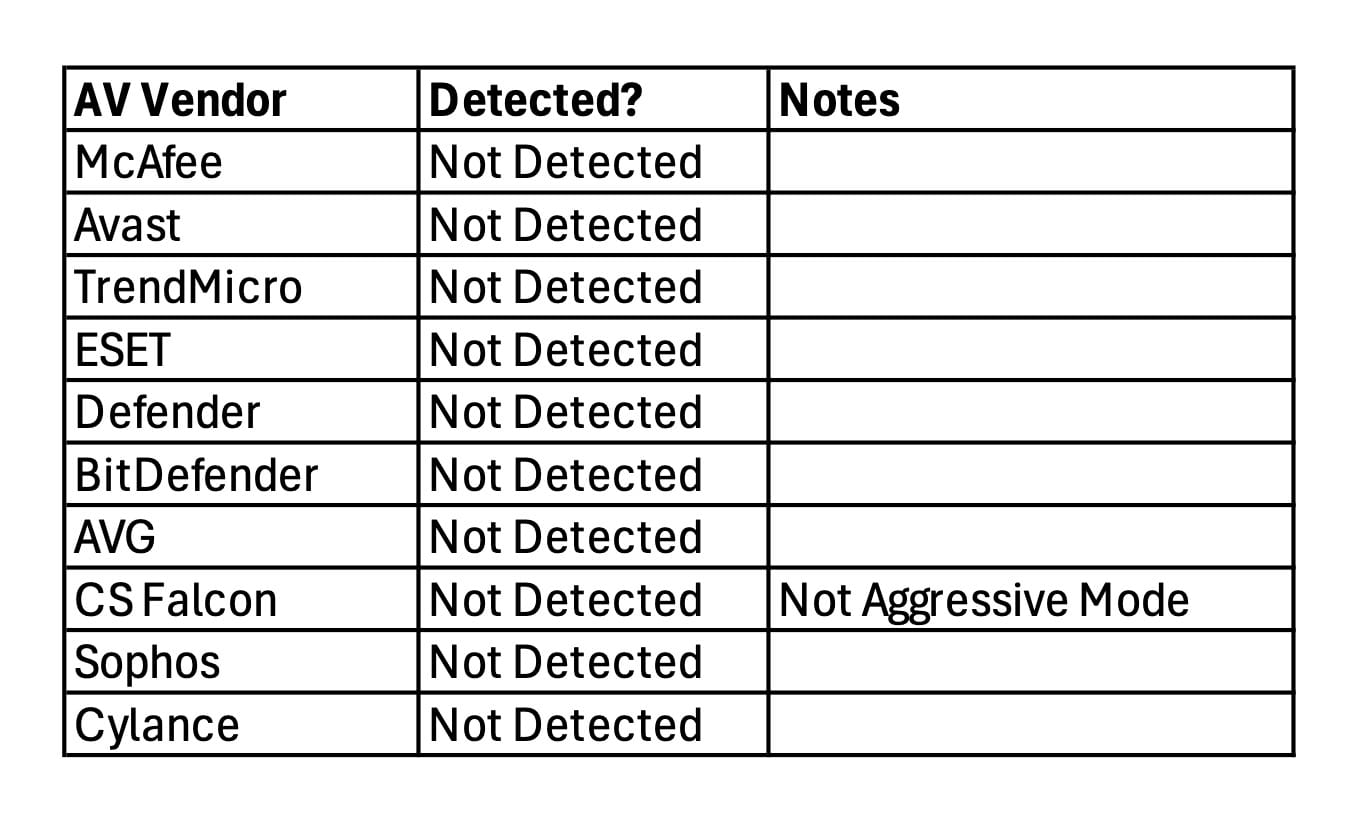
From a defensive standpoint, SilentFrame doesn’t exploit the browser so much as it repurposes its debugging understructure. This is becoming a much more common attack path as Threat Actors increasingly prioritize using existing systems, as they are less strictly monitored. During testing, we ran this against multiple endpoint security platforms, including CrowdStrike Falcon; no alerts were generated for this activity. It is worth noting that one of our malware developers pointed out that the test system running Falcon was not running it in its most aggressive enforcement mode, and that similar techniques have previously encountered friction under that mode. Regardless, the behavior itself was undetected even under enforcement conditions more restrictive than default.
Detection and prevention of this proof-of-concept, or others similar to it, hinge less on the JavaScript executed within the browser and more on the conditions that enable CDP access in the first place. High-confidence indicators include Chromium-based browsers launched with the `--remote-debugging-port` flag, persistent local WebSocket connections to 127.0.0.1, and repeated use of the CDP `Target` domain consistent with automation or instrumentation workflows. When correlated together, these signals strongly suggest that the browser’s control plane has been externally attached, even if the browser’s visible behavior remains unchanged.
The best way to monitor for these would be to use a tool like SysInternal’s Sysmon ingested into your SIEM.
For process-level detection, the anchor event is Sysmon `Event ID 1, Process Create`. This is where you catch the Chromium-based browsers being launched with non-standard command-line arguments. You’re specifically looking for `msedge.exe`, `chrome.exe`, or other Chromium derivatives where the `CommandLine` field contains `--remote-debugging-port`. That flag alone isn’t malicious, but in user workstations it is rare enough to be a meaningful starting condition. If you already log parent process information, correlating the browser launch back to `explorer.exe` versus a background process or script host adds even more context.
For the control channel itself, `Sysmon Event ID 3, Network Connection`, is the next high-signal source. This event will show loopback connections to `127.0.0.1` on the specified debugging port, typically `9222` but not always as the debugging flag allows for any port to be specified. Normal browsing does not involve persistent loopback TCP connections to the browser process, so a long-lived or repeatedly re-established connection to `localhost` tied to a Chromium PID is a strong indicator that CDP is in use. When you can correlate `Event ID 3` back to a browser process previously flagged in `Event ID 1`, the confidence jumps significantly.
If you want to catch the “poisoning-the-well” setup step rather than just the runtime behavior, `Sysmon Event ID 11`, File Create, is useful for monitoring `.lnk` modifications in user-accessible locations such as the Desktop, Start Menu, or Taskbar pin directories. Changes to existing browser shortcuts, especially when followed by a browser relaunch with modified arguments, form a clean before-and-after trail that is easy to explain to incident responders.
Optionally, `Sysmon Event ID 7`, Image Load, can provide supporting context by showing script engines or unusual modules being loaded into non-interactive processes that later establish loopback connections to the browser. This is not a primary signal, but it helps distinguish developer tooling from malicious automation during deeper triage.
Testing Results
The following vendor detection table presents our test results on whether the action was detected by the vendor. This table is only relevant as of 01-29-2026. Any testing conducted after this date may yield different results.